Please try these steps to get your BookingBuilder working. Because they require administrative permissions on the system, you might need help from IT or someone else with that level of access.
- Find the BB icon near your computer's clock- you might have to click the little up arrow to the left to show your hidden icons. It will be a BB, which might be green, yellow, or red, or it may even be entirely missing. If you do see it, right click the BB icon and choose Exit, but otherwise just go to the next step.
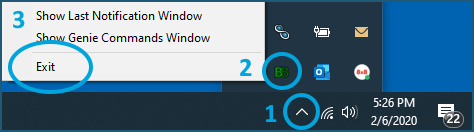
- Right click the BB icon and choose Exit.
- Close any open GDS programs (Amadeus, Sabre, Smartpoint/TP+, Worldspan)
- Open Task Manager by right clicking an empty space on the Task Bar and choosing Task Manager, or press the CTRL, ALT, and Delete keys at the same time, and pick it out from there.
- On the Processes tab of Task Manager, search for ' book '. That will bring up BookingBuilder's processes at the bottom (it might bring others up too). BookingBuilder's are BBDesktop, BookingBuilder Browser, and LMGoogleChromeHost. Click on each and click End task, or right click them and choose End Task.
- Close Chrome and Edge.
- Navigate to the folder C:\Program Files (x86)\BookingBuilder.
- Find lmreg and right click on it, then choose Run as Administrator or More, then Run as Administrator. You might see a black window pop up on the screen- it should go away on its own.
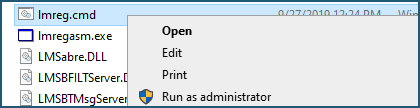
- Do the same with lmregasm.
- Now do that with repairinstallation . That one will probably pop up a BookingBuilder install screen- click on through it.
- Start BookingBuilder and see if this helped.
Comments
0 comments
Please sign in to leave a comment.